


Posting From Your Android Phone - Fixed!
Posted by insertponceyfrenchnamehere on Tue, 03 May 2022
Some of you have been having issues with posting your work using an android phone. Ewan and John our techie have been working really hard to fix this. We think it's an issue with your phone rather than the site, but Ewan has finally found a workaround for which we're very grateful!
Details below:
- Open ABCTales as normal on your phone, via your browser.
(works for Firefox and Chrome)
- Log in
- Look for the three dots top right of the phone screen (chrome) bottom right (firefox), press once
- Look for and tick the Desktop site box in the dropdown menu.
- Do your stuff.
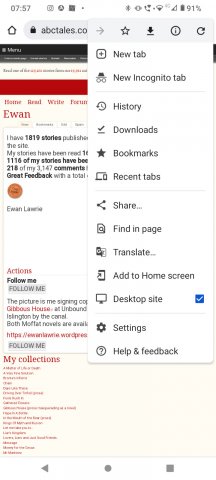
You may have to do it every time, I know it’s a pain in the bum, but hey, at least you’re posting… AND it’s showing up.
Plkease email me at claudine@abctales.com if you have any further issues.
- insertponceyfrenchnamehere's blog
- Log in to post comments
- 66295 reads
Comments
I hope it's working for you
I hope it's working for you now TJ?
So Cool*
The ABC team does a tech update, work around, on a mobile OS glitch.... I never expected that here. Hats off team... I feel safer already. Thank you*
Helloooooo. Yooohoooo
Helloooooo. Yooohoooo
Hello Denni! Very nice to see
Hello Denni! Very nice to see you! Were you experiencing The Glitch? Did we fix it?
Fix for Android phone using Edge as a browser
Works for Edge v148.0 in an Android v15 phone.
Open ABC tales on phone / Login / Click the 3 bars lower right / settings / site settings / show desktop site as default
----------------------------------------------------------------------------------------------------------------
There's another way to do it too which is Edgier :
Open ABC tales on phone / Login / Click the 3 bars lower right /
Looking at the icons displayed below. If the bottom left one says 'Mobile Site' then you don't need to do anything because you are already in Desktop Site mode. If the bottom left one says 'View Desktop Site' then that means you are in Mobile Site mode - you need to click the 'View Desktop Site' icon.
In other words you can toggle here between Desktop Site and Mobile Site modes if you should want to. I'd want Mobile for looking at say, the BBC website, and Desktop for ABC.
You can toggle between which one you want as default by using the Site Settings as in the first fix.
Thank you very much for this
Thank you very much for this Kat!
Well it works for me on the
Well it works for me on the versions specified. I'd be interested to know if it works for anyone else.